Four Paper-Collage Videos, Made Step by Step
Motion graphics that explain an idea — dominoes, a mountain, a strongman, and a money story. The full method: one still image, one motion prompt, four videos. Every prompt is here to copy.
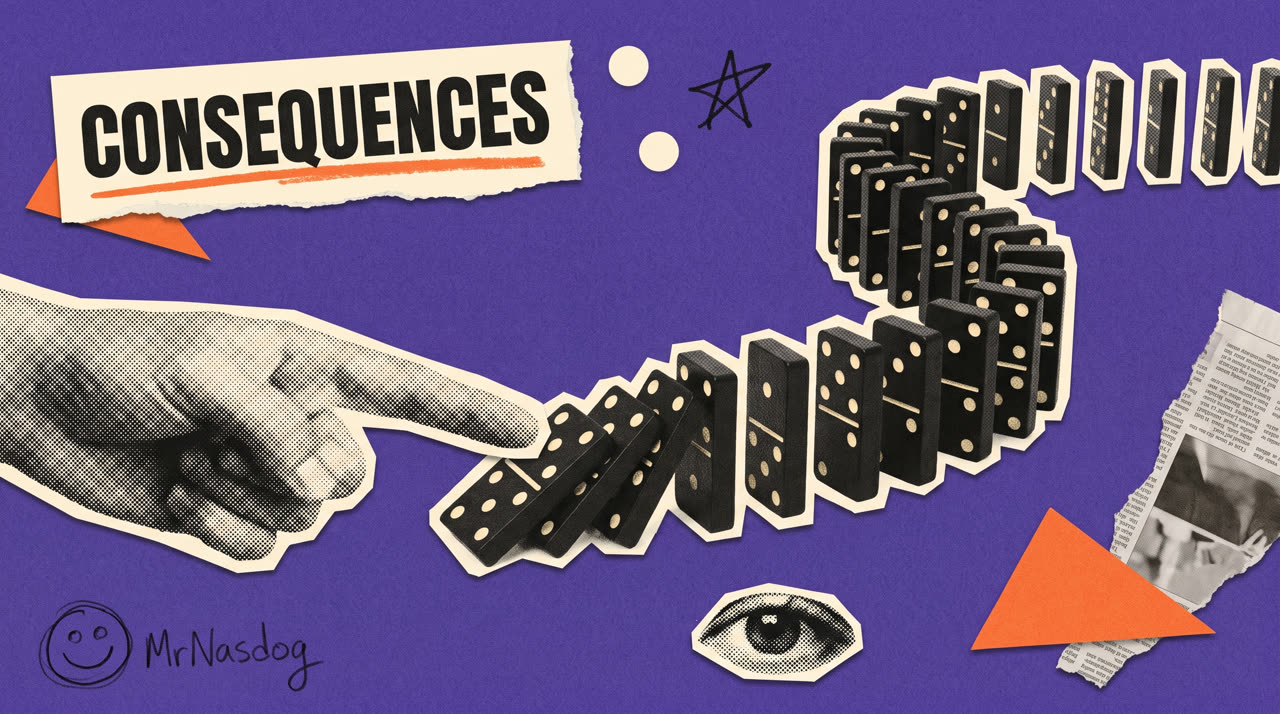
Most AI video chases realism — better skin, better light, better camera. Motion graphics does something else: it explains an idea. A row of dominoes falling is the idea of consequences. A crowd climbing a mountain is the idea of competition.
That’s why we like it. You don’t need to win a beauty contest against photoreal AI. You need one clear idea and one good visual metaphor.
Here are four we made, then the exact method underneath them.
The four videos
The first three are short, flat and colorful. The fourth is longer, deeper and narrated. Same method underneath — only the depth and the length change.
What you need
- A Higgsfield account (both models live there, no installs).
- Nano Banana — makes the still picture.
- Seedance 2.0 — turns that picture into motion, with sound.
- Optional for a long one: ElevenLabs for narration and music, and ffmpeg to join the clips.
Now the method. It’s the same five steps every time.
Step 1 — Turn the idea into ONE object
This is the whole job, and it happens before any AI. Ask: what single object does this idea look like?
| The idea | The object |
|---|---|
| One choice sets off everything | A row of dominoes |
| Everyone competing for one prize | A crowd climbing to one flag |
| A decision feels heavy | A strongman holding a giant question mark |
| Something is tiny inside something huge | One small block in a city of blocks |
If you can’t name the object, the video won’t work — no prompt saves a fuzzy idea. Write it in one line: “a finger pushes one domino and the whole line falls.”
Step 2 — Build the still picture first
We always make the picture before the video. It’s cheap to fix a picture and expensive to fix a video.
In Higgsfield, choose Create Image → Nano Banana, set 16:9 (or 9:16 for Reels), and paste this — swapping the scene line for your own:
Colorful paper-collage frame, LANDSCAPE 16:9, on a deep purple
textured felt-paper background.

SCENE: [describe your object and what it is doing — e.g. a large
black-and-white halftone photo cutout of a hand with a pointing
finger pushes the first of a long row of black domino tiles that
curves away to the upper right, the first few already toppling].

A torn cream paper label reads "[YOUR WORD]" in bold condensed caps
with a rough orange underline. Accents: orange paper triangles,
cream circle dots, a small black ink scribble-star, a torn
newspaper scrap, a halftone cutout eye.

Flat printed collage, torn and scissor-cut edges, subtle paper
shadows, risograph texture, slight grain, colorful.
No gloss, no 3D render, no watermark.
Four things make this look consistent every time:
- One background colour for everything you make (ours is deep purple).
- One accent colour only — orange. Nothing else gets to be bright.
- People are black-and-white halftone cutouts with a rough white edge. Never full colour.
- Torn paper, tape, scribbles, dots — the handmade litter is what sells it.
A small thing worth stealing: we add a pencil doodle of a face and a handwritten name in the corner. It signs the work without a logo.
Step 3 — Write the motion in three parts
Here’s the part most people get wrong: they animate one thing and leave everything else frozen. Then it looks dead.
A good motion prompt has three parts:
① The build-in. The collage assembles itself. Labels slide in, dots pop, the underline draws itself — one after another, never all at once. ② The main action. The one thing the video is about. Dominoes fall. The crowd charges. The weight lands. ③ The camera. One continuous move with real depth — track, crane, push in, drift around. Never a locked, flat, front-on camera.
In Higgsfield: Create Video → Seedance 2.0, attach your picture as the start image, set 16:9, 6–8 seconds, audio ON. Then paste:
Animate this paper-collage scene in its exact style — paper cutouts
on a purple background, stop-motion puppet feel, never glossy CGI.

OPENING (staggered, ~1.5s): the label drops in with a paper slap and
its orange underline draws itself; triangles and dots pop in one by
one; the newspaper scrap slides in; the pencil doodle wiggles as if
just drawn.

MAIN ACTION: [the one thing — e.g. the finger pushes the first domino
and the whole curved chain topples one by one in a running wave, with
real tumble physics].

CAMERA: one continuous move — [e.g. starts low-left, tracks right and
rises, following the falling wave], with parallax between foreground
and background. Not a locked frontal camera.

Everything keeps breathing — labels sway, scraps flutter, dots pulse.
Nothing is frozen. All text stays exactly as in the start frame.

AUDIO: diegetic sound effects only — paper slaps, and [the sound of
your action]. No music, no narration, no speech.
The two lines that matter most: “nothing is frozen” and “all text stays exactly as in the start frame.” The first stops the dead look. The second stops the model from rewriting your words into gibberish.
Step 4 — Check it, and know what to re-run
Watch for three things:
- Does the action read? If you can’t tell what happened, the metaphor is too complicated — go back to Step 1, not the prompt.
- Is the whole frame alive? If only one element moves, add more items to the “opening” list.
- Did the text survive? If a label turned into nonsense, re-run — it’s random, and a re-run usually fixes it.
Two practical notes from ours: a crowd needs to be described as “seen from behind, leaning into the slope, climbing uphill” or the figures end up standing around; and scenes full of people cutouts run more reliably on Seedance than on other models.
Step 5 — For a long one, chain the clips
Video 4 is 1:26 — far past any single clip. Longer pieces are just short clips in a row:
- Write the script first, then record narration (we use ElevenLabs) and ask for word timestamps.
- Cut the script into beats — one idea per beat, one picture per beat.
- Make each beat with Steps 2 and 3, trimmed to that beat’s exact narration length.
- Join them with ffmpeg, lay the narration on top, and slide music underneath.
One trick worth copying: at the punchline, cut the music to silence. The sentence lands twice as hard in the quiet.
What it costs
Short clips run about 3 credits per second of finished video — so a 7-second piece is around 20 credits, a few cents. The still pictures are 1–2 credits each. Budget an extra 20% for re-runs; everyone re-runs.
The short version
One idea → one object → one still picture → three-part motion prompt → check → repeat.
Pick something you want to explain, name the object it looks like, and make one seven-second clip today. That’s the whole thing.