Run From a Bear, Fly Over New York
A cinematic 10-second dream video in 3 steps: log in to Higgsfield, make your character, paste one prompt into Seedance 2.0. The full prompt is here to copy.
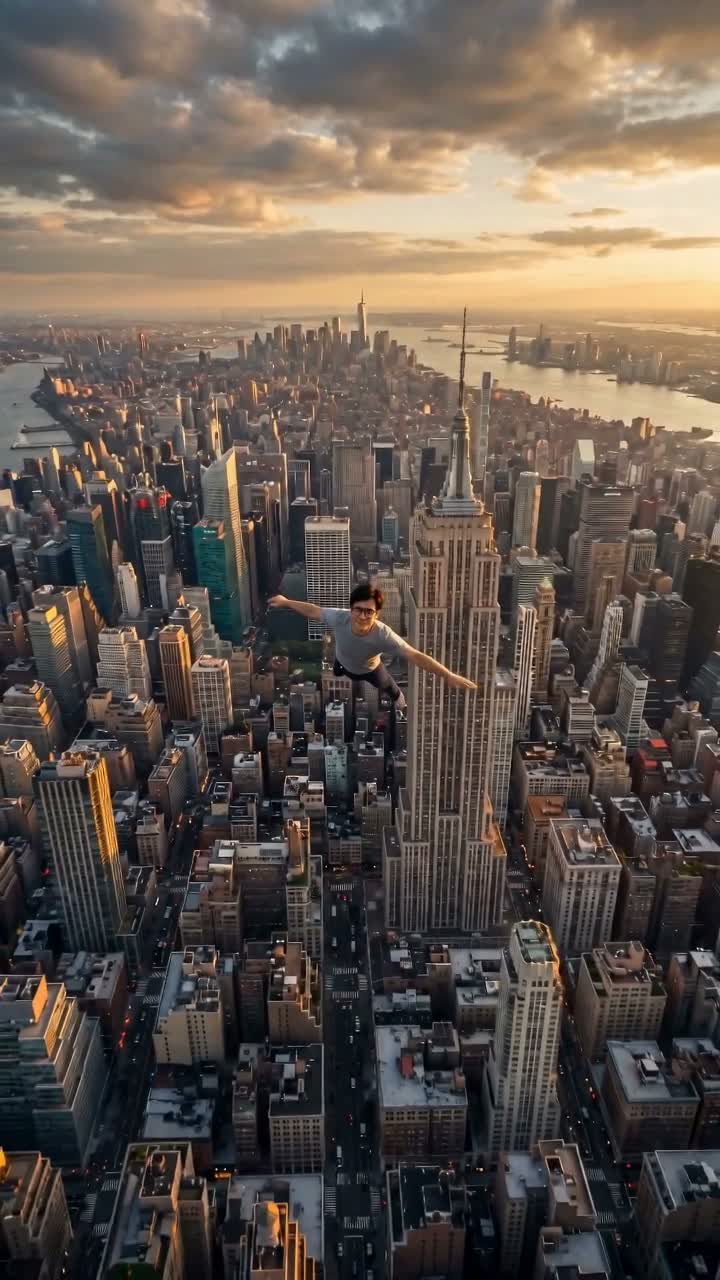
This looks like a movie. It isn’t. It’s one photo of your face and three steps, and the whole thing is a 10-second clip you can post to Reels, TikTok or Shorts.
No filming, no acting, no editing skills. We’ll make our own character, hand one prompt to the AI, and let it build the scene. Here’s the whole thing, start to finish — copy everything.
What we’re using
- A Higgsfield account (this is where the AI lives).
- Nano Banana — makes the picture of our character.
- Seedance 2.0 — turns that character into the moving video, with sound.
- One clear selfie of our face to start from.
That’s all. Now the three steps.
Step 1 — Log in to Higgsfield
Go to higgsfield.ai and sign in (or make a free account). Everything below happens inside this one site.
Two models do the work here, and we pick them from a dropdown when we create — Nano Banana for the picture, Seedance 2.0 for the video. Nothing to install.
On credits: each picture costs a few credits; the 10-second video costs about 90 credits at 1080p (or less at 720p). A monthly plan is plenty for a video a day.
Step 2 — Make our character
The AI needs to know who the hero is. So first we build a character sheet — one image of ourselves from three angles that the AI reuses in every shot, so our face stays the same the whole video.
- In Higgsfield, choose Create Image and pick the Nano Banana model.
- Upload our selfie as the reference image.
- Set the size to 16:9.
- Paste this prompt:
Create a CHARACTER SHEET of the same person from my photo — 3 views
side by side on a plain white studio background: LEFT full body
standing, CENTER a dynamic action pose, RIGHT a portrait close-up.

Keep my real face and glasses exactly the same in all three views —
do not change or idealize the face.

Give me a modern, cool outfit — for example a light grey graphic
tee, black shorts, and clean white sneakers.

Photorealistic, cinematic studio lighting with a rim light and soft
fill, sharp and high detail. No text, no watermark.
Hit generate. If the face looks like us and the outfit feels right, we’re done — save that image. If not, generate again, or change the outfit line to any look we want. This picture is our character forever; we only make it once.
Tip: keep our real glasses and face, and only change the hair or clothes. The closer it stays to the real selfie, the better the video holds together.
Step 3 — Paste the prompt into Seedance 2.0
Now the video. Back in Higgsfield, choose Create Video and pick Seedance 2.0.
Add our character sheet from Step 2 as the reference image (so the person stays us), then use these settings:
| Setting | Value |
|---|---|
| Model | Seedance 2.0 |
| Aspect ratio | 9:16 (vertical — Reels, TikTok, Shorts) |
| Resolution | 1080p (or 720p to spend fewer credits) |
| Duration | 10 seconds |
| Generate audio | ON (Seedance makes the sound itself) |
| Count | 1 |
Then paste the whole prompt below and generate:
One continuous cinematic shot, no cuts, photorealistic. Keep the same
face, glasses and outfit the whole time.

0-2s: a person types at a laptop in a cozy home. A huge realistic
brown bear walks out from the LEFT side of the room near a bookshelf.
He turns his head, sees the bear, and freezes in fear.

3-5s: he leaps up and runs TOWARD the camera to escape. The bear
chases behind him. The camera pulls back, then swings around to
follow him from behind.

5-6s: from behind him, he flings the front door open — but outside
there is NO balcony and NO floor, only open sky high above the city.
He steps into nothing and drops face-down.

6-8s: seen from behind and slightly above (only his back), he falls
face-down high over New York at golden-hour sunset. The camera slowly
moves around to his side so we see his face.

8-10s: he steadies into a smooth wingsuit-style glide (no wings),
curving past the Empire State Building over the whole Manhattan
skyline. Fear turns into joy. End on a wide aerial shot with him
small against the glowing city.

Golden dusk, real clouds. Cinematic, realistic motion, not cartoon,
not CGI-looking.

Sound: typing, then a bear growl, running footsteps, the door swinging
open — and from the moment he falls, tense fast music with strong wind.
The video takes a couple of minutes. When it’s done, download it — that’s the finished clip at the top of this page.
Two things to look for
- Does the face still look like us? If it drifts, generate again with the character sheet added as the reference — that’s what keeps it locked.
- Left, right, up, down. The AI sometimes flips a direction or has us fall face-up. If a moment looks wrong, we just say it more plainly in the prompt (“only his back, face pointing down”) and re-run. Two or three tries is normal — that’s the real workflow, not a mistake.
Make it our own
The bear and New York are just words in the prompt. Swap them:
- Chased by a bear → a wave, a shadow, a storm.
- Falling over New York → London, Tokyo, our own city, the ocean.
- The mood → keep it golden-hour and warm; that’s the look that comes out most cinematic.
Same three steps every time: log in, make the character, paste the prompt. One photo of our face, and we’re flying over any city in the world.