Fire on Your Head, Then Swap the Whole Room
Two AI video effects in 4 seconds each — with the exact prompts and settings. Made with Higgsfield and Seedance 2.0.
Everyone thinks AI video effects are hard and expensive. They’re not.
Here are two effects you can add to a normal phone video: set your own head on fire while you keep talking, and swap the whole room behind you for a penthouse office with a city skyline. Each one is a 4-second clip that costs about 36 credits on Higgsfield — a few cents of a monthly plan. You film once, transform two short moments, and drop them back into your edit.
This is the full guide. The exact settings, the exact prompts, copy and paste. I’m the first one following it too.
What you need
- A phone video of yourself talking to the camera.
- A free trimming app — CapCut works, so does the Instagram or TikTok editor.
- A Higgsfield account with Seedance 2.0 (the model that does the transform).
That’s it. No green screen, no editing skills.
The one rule that makes it work
Seedance keeps your face and your camera, and changes one thing. Respect that and it looks real. Fight it and your face drifts. So:
- One effect per clip. Fire in one clip, background swap in another. Never both at once.
- Film chest-up and hold fairly still on the effect moment. Less motion means your face stays locked.
- Sitting is fine — better, even. A still, seated shot is the easiest thing for the model to keep consistent. You do not need to stand up.
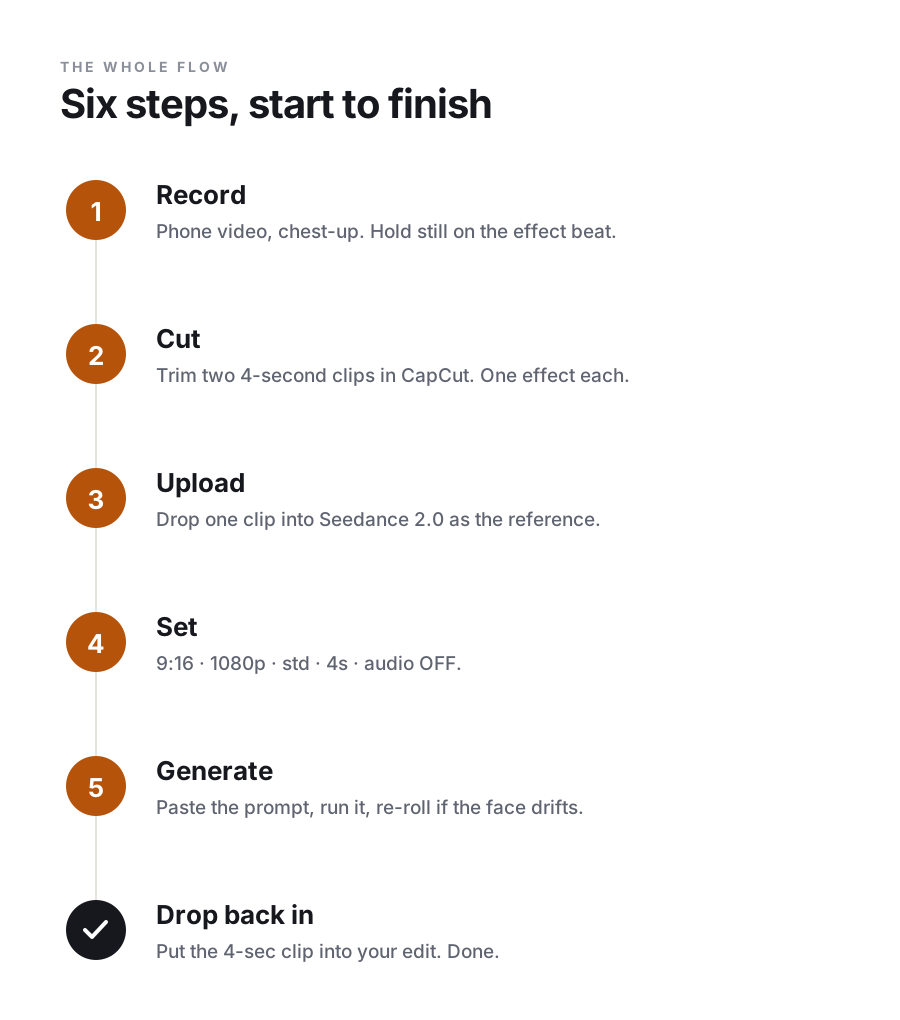
The whole flow
Step 1 — Record
Film your video like normal, chest-up. When you reach the line where an effect should happen, hold steady for a clean few seconds. Keep the top of your head in frame for the fire; keep the space behind you open for the swap.
Step 2 — Cut two 4-second clips
Open CapCut. Trim out just the moment where each effect happens and export it on its own. You end up with two short files — call them fire.mp4 and background.mp4. This is trimming, not editing. Thirty seconds of work each.
Why cut them? Seedance transforms exactly the clip you give it. Hand it your whole video and it won’t know which moment you mean — and you’d pay to regenerate all of it.
Step 3 — Upload
Open Higgsfield, choose Seedance 2.0, and drop your first clip in as the reference (the video it starts from).
Step 4 — Use these exact settings
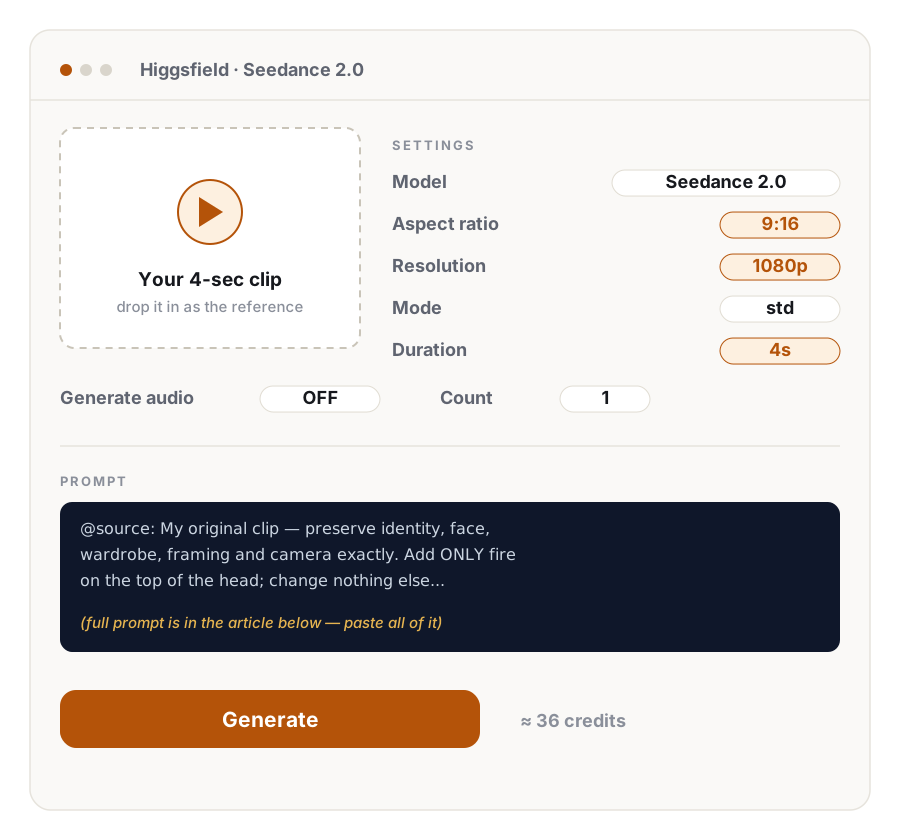
| Setting | Value | Why |
|---|---|---|
| Model | Seedance 2.0 | The one that keeps your identity |
| Aspect ratio | 9:16 | Vertical — TikTok, Reels, Shorts |
| Resolution | 1080p | Those apps show 1080p. 4K is wasted money. |
| Mode | std | Standard quality (needed for 1080p) |
| Duration | 4s | The minimum. Short = cheap. |
| Generate audio | OFF | Keep your own voice from your edit |
| Count | 1 | One try first; re-roll only if needed |
Step 5 — Paste the prompt
Paste the whole block, top to bottom. The @source line tells the model what to keep. The lines under it describe the one change.
Effect A — Fire on your head
@source: My original clip — a person talking to camera, filmed chest-up,
holding fairly still. Preserve identity, face, hair, skin, wardrobe,
framing, lens and camera motion exactly. Add ONLY fire on the top of the
head; change nothing else.

Photoreal. 9:16. 4s. Natural indoor look. NON-IP, generic flame. SFX only.

Same framing and lens as the source. The person keeps talking to camera,
expression and identity unchanged. Fire ignites at the crown of the head
with a soft whoomph, then builds into a steady flame that rises and
flickers with individual orange-and-yellow tongues, throwing warm
flickering firelight down onto the forehead, face and shoulders, with a
soft rim light and dancing shadows behind. The person stays calm and
unbothered, still talking, as if nothing is happening. Face and identity
unchanged throughout.

SFX: a soft whoomph as it catches, then a low steady flame roar and
crackle, with the occasional ember pop.
Effect B — Swap the whole background
@source: My original clip — a person seated on a chair, filmed chest-up,
talking to camera indoors, holding fairly still. Preserve identity, face,
wardrobe, seated pose, performance, framing, lens and camera motion
exactly. Replace ONLY the background; keep the person exactly the same.

Photoreal. 9:16. 4s. Warm daylight look. NON-IP. SFX only.

Same framing and lens as the source. The person stays seated and keeps
talking, expression and identity unchanged. Replace the entire indoor
background with a bright modern penthouse office — a floor-to-ceiling
window filling the frame behind them, a sunny city skyline beyond the
glass, clean minimalist interior. Relight the person to match: soft warm
daylight coming through the window from screen-right, gentle soft-edged
shadows, a cool sky bounce off the glass and a warm bounce from the
interior, a touch of matching depth of field so they sit naturally in the
room with no hard cut-out edges or halos. Face, identity and seated pose
unchanged throughout.

SFX: quiet office room tone with a faint city hum through the glass.
Want a different world? Swap the penthouse line for a golden-hour mountain clifftop, a sunny tropical beach, or bright desert dunes. Keep it daytime and warm — night and neon force the model to relight your face, and that’s where it starts to drift.
Step 6 — Generate, check, drop back in
Run it. Look at two things: does your face still look like you, and does the effect sit in the scene instead of looking pasted on? If yes, download it and drop the 4-second clip into your edit, replacing the original moment.
If not, re-roll. That’s another ~36 credits, so budget about 50 credits per finished effect to allow one retry.
When it looks off
- Your face changed → the shot moved too much, or you asked for night/neon. Re-film holding stiller, keep it daytime.
- Looks pasted in → the prompt already asks to match the light and haze; re-roll once. Warm daylight backgrounds blend the easiest.
- Fire too big → add “a small, contained flame” to the fire prompt.
- Chair looks weird in the new world → frame tighter, chest-up, so the chair is out of shot.
What it costs
At 1080p and 4 seconds, each clip is about 36 credits. Even with a re-roll, one effect a day runs near 1,500 credits a month — comfortable inside a 3,000-credit plan. Skip 4K entirely: short-form apps never show it, so it’s money for nothing.
Two effects, four seconds each, a few cents apiece. That’s the whole trick.